Quick answer: A UK construction timesheet needs the worker's name and trade, the project and site address, the date, start/finish times, unpaid breaks, total hours, the task or cost code, and a supervisor sign-off — this satisfies Working Time Regulations 1998 record-keeping and standard payroll/CIS requirements. Grab the free Excel template below, which auto-calculates daily and weekly hours.
Keeping accurate timesheets is one of the most overlooked jobs on a UK construction site — until payroll is wrong, a client disputes hours, or a Working Time Regulations check comes up. This guide gives you a ready-to-use construction timesheet template UK format, what it legally needs to include, and how to move from paper to digital without losing anything in the switch.
Why a Proper Timesheet Template Matters on UK Sites
Under the Working Time Regulations 1998, employers must keep records showing how many hours each worker has done. On a construction site, that record also feeds payroll, CIS subcontractor payments, client billing, and project cost tracking — so a timesheet isn't just an admin form, it's the source data for most of your back office.
A good template needs to answer, at a glance:
Who worked — name, role, and whether they're employed or a CIS subcontractor
Where they worked — project name, site address, and cost code
When they worked — date, start time, finish time, and breaks
What they did — task, trade, or work package
How it's approved — supervisor sign-off before it goes to payroll
Free Construction Timesheet Template (UK Format)
Download the free weekly timesheet template (.xlsx) — hours calculate automatically from start/finish times, with a weekly total and sign-off section built in. Or copy the structure below into your own sheet:
Field | Example |
|---|---|
Employee / Subcontractor Name | Jade Wilson |
Role / Trade | Groundworker |
Project | Riverside Tower — Phase 2 |
Site Address | 14 Riverside Rd, Manchester |
Date | 18/08/2026 |
Start Time | 07:30 |
Finish Time | 16:30 |
Break (unpaid) | 30 min |
Total Hours | 8.5 |
Task / Cost Code | Concrete pour — Level 3 |
Overtime (Y/N + hrs) | Y — 1.5 hrs |
Supervisor Sign-off | C. Lopez |
Weekly timesheets simply repeat this row for each working day, with a totals row at the bottom for the week. Daily timesheets use one row per person per day and are easier to reconcile against site diaries.
Paper vs Digital Timesheets
Paper still works for small crews, but it breaks down fast once you're running more than one site: sheets get lost, handwriting is disputed, and someone has to manually re-type everything into payroll at the end of the week.
This is where digital attendance tools earn their keep. Platforms like SiteNext replace the paper timesheet with GPS-verified clock-in/clock-out, so every entry is timestamped and location-tagged automatically instead of filled in by memory at the end of the day.
What to Look for in a Digital Timesheet Tool
If you're moving off spreadsheets, these are the features that actually save admin time:
Photo verification on clock in/out — workers take a photo when they punch in and out, which prevents buddy punching and gives you visual proof of attendance
GPS location tagging — every clock-in is tied to the correct job site automatically, so there's no argument about where someone was working
Automatic date & time stamps — no more backdated entries or rounded-up hours
Live workforce map — see who's on which site in real time, useful for multi-site contractors
Report generation in PDF, Excel and CSV — export weekly timesheets straight into payroll or CIS processing with custom date-range filtering
SiteNext - Manage tasks, RFIs, site diaries, team conversations, photos, attendance, and reports—so everyone stays informed and nothing gets missed.
Real-Time Attendance Dashboard
Beyond individual timesheets, site managers need to see who's actually on site right now — not just what got logged at the end of the week. SiteNext's attendance dashboard gives you that live view: who's clocked in, who's on break, total hours logged today, and how many timesheets are waiting on approval, all updating in real time as workers clock in and out across your sites.
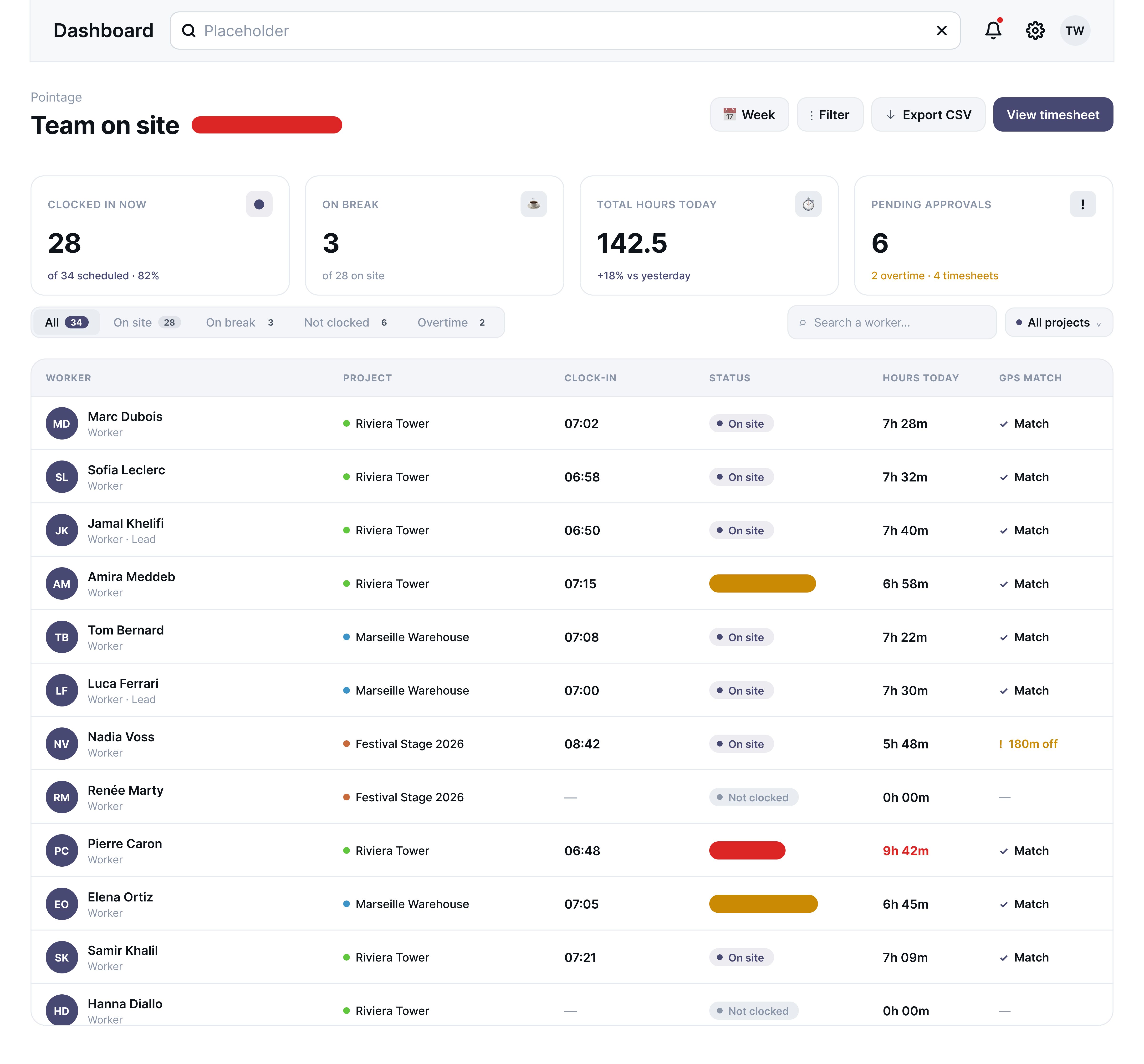
Live headcount — see exactly how many of your scheduled workers are clocked in right now, broken down by On site, On break, Not clocked, and Overtime
Per-worker GPS match — each row shows whether the clock-in location matched the assigned project site, flagging mismatches instead of leaving you to guess
Total hours today, at a glance — a running total across the whole team, so you catch overtime creep before it hits payroll
Pending approvals in one place — overtime and timesheet approvals waiting on a supervisor are surfaced automatically instead of buried in a spreadsheet
Filter by project — switch between Riviera Tower, Marseille Warehouse, or any other site to check attendance project by project
Export to CSV or open the full timesheet — pull the data straight into payroll whenever you need it
This is the piece that turns a timesheet from a weekly paperwork exercise into something you can check at 9am to see who's actually on site.
Quick FAQ
How long should I keep construction timesheets in the UK? Best practice is to retain time and pay records for at least 3 years, in line with Working Time Regulations obligations and standard payroll audit windows.
Do subcontractors need timesheets too? Yes — even where subcontractors are paid a fixed price, timesheets help verify hours on site for CIS records, insurance, and any client-facing progress reporting.
Excel or a dedicated app? Excel is fine for a single small site. Once you're juggling several projects or subcontractor teams, a tool with GPS attendance and automated reporting removes the manual re-entry that causes most payroll errors.
Want to stop chasing paper timesheets?
no card required. Join the Waitlist