We compared nine of the best construction management software platforms in Australia for 2026. Whether you manage residential builds, commercial projects, or trade teams, these tools can simplify scheduling, site diaries, task management, compliance, and workforce tracking.
Why Australian Construction Teams Need Purpose-Built Software
Running a job site off spreadsheets, group chats, and paper diaries doesn't scale. Australian builders face a specific set of pressures that generic project management apps weren't built for:
Multiple job sites spread across suburbs or regions, with crews moving between them
Compliance requirements — SWMS, site diaries, incident logs, and audit trails that regulators and head contractors expect to see
Subcontractor coordination across trades that all need visibility into the same schedule without stepping on each other
GST-ready quoting and AUD pricing, since most global tools are priced and taxed for the US or UK market
Patchy site connectivity, which means the software has to work properly on a phone, not just a desktop dashboard
What to Look For in Construction PM Software
Before comparing tools, it helps to know which features actually move the needle on an Australian job site:
Digital site diary — daily logs, weather, labour on site, deliveries, and photo evidence, replacing the paper diary in the ute
Task management — assign, track, and close out tasks by trade, with clear ownership and due dates
Scheduling and planning — Gantt charts or timelines with dependencies, so a delay in one trade automatically flags downstream impact
GPS attendance / time tracking — clock-in and clock-out tied to site location, for payroll and labour compliance
Communication tools — a single thread per task or project instead of scattered texts and emails
Mobile-first design — built for a phone on a dusty site, not a retrofit of a desktop tool
Local pricing and support — AUD pricing, GST handling, and support hours that match Australian business hoursWith that checklist in mind, here's how the leading platforms stack up.
here's how the leading platforms stack up.
Top 9 Construction Management Software Platforms in Australia
1. SiteNext — Best All-Round Pick for Construction Companies of Any Size
SiteNext is a construction site management SaaS platform built around the things site managers actually do every day: log the site diary, manage tasks, and keep the schedule realistic. It's designed to scale cleanly from a small residential builder running one crew to a large commercial operation running multiple concurrent sites.
Standout features:
Digital site diary with templates, photo uploads, and exportable reports — no more chasing paper diaries at the end of the week
Gantt chart with task dependencies, so schedule slippage on one task flags every task downstream
GPS-based attendance tracking for labour on site
Threaded chat tied to tasks and projects, keeping site communication out of scattered text messages
Straightforward, transparent monthly pricing (AU$ 160/admin/month, or AU$ 128/admin/month billed yearly) with unlimited field workers included on both plans — pricing that stays predictable whether you're running one site or twenty
Best for: Small, medium, and large construction companies alike — builders, site managers, and project teams who want site diary, task management, and planning in a single tool that grows with the business, without an enterprise sales process or a six-figure ERP rollout.
Why it stands out against the bigger platforms: Tools like Procore and Access Coins are built primarily for large commercial contractors and priced accordingly, often requiring lengthy onboarding and dedicated admin support. SiteNext delivers the same core workflow — diary, tasks, planning, attendance — in one platform that's simple enough for a small builder to onboard in a day, yet robust enough for a large operation managing multiple sites, all on per-admin pricing with unlimited field workers included.
2. Procore — Best for Large Commercial Contractors
Procore is a widely used enterprise platform., with deep modules for RFIs, submittals, QA/safety, and site diaries across multi-project portfolios.
Standout features: Unlimited user collaboration, extensive document control, financial and budget tracking, and a large marketplace of integrations.
Best for: Tier 2/3 commercial builders and large general contractors standardising processes across many concurrent projects.
Trade-off: Powerful but complex — smaller teams often find the setup and cost heavier than what they need day-to-day.
3. Buildxact — Best for Estimating-Led Residential Builders
Buildxact focuses on the pre-construction side: takeoffs, estimating, and quoting, with scheduling and job costing layered on top.
Standout features: Material takeoff tools, supplier price lists, quote-to-schedule workflow.
Best for: Residential builders and renovators whose biggest bottleneck is fast, accurate quoting.
4. Buildern — Best for Preconstruction-to-Financials Coverage
Buildern is an all-in-one platform covering preconstruction, scheduling, and financial tracking for residential and commercial builders.
Standout features: AI-assisted scheduling and milestone tracking, budget and progress-claim tracking, client communication portal.
Best for: Builders who want scheduling and financials tightly integrated in one system.
5. Aroflo — Best for Trade and Service-Based Businesses
Aroflo is built more for trade contractors and service businesses than head-contractor site management, with strong job and asset tracking.
Standout features: Job scheduling, quoting, invoicing, and asset/maintenance tracking.
Best for: Electrical, plumbing, and trade service businesses managing many small jobs rather than one large build.
6. Fergus — Best for Trade Job Management
Fergus is a job management platform popular with trade businesses that need quoting, scheduling, and invoicing in one flow.
Standout features: Job costing, timesheets, and invoicing built around the trade job lifecycle.
Best for: Small trade teams (plumbers, electricians, HVAC) rather than multi-trade commercial builds.
7. Sitemate — Best for Site Forms and Safety Documentation
Sitemate (Dashpivot) focuses on digitising site forms, safety documentation, and daily reporting.
Standout features: Customisable digital forms, safety and quality checklists, audit-ready reporting.
Best for: Teams whose priority is compliance documentation over full project scheduling.
8. Access Fonn — Best for Mobile-First Drawing and Defect Management
Access Fonn is a simple, mobile-first hub for drawings, RFIs, and defect lists, aimed at small-to-mid contractors and specialty trades.
Standout features: Unlimited users, fast rollout, drawing markup and defect tracking.
Best for: Specialty trades needing a lightweight tool for drawings and site forms rather than a full PM suite.
9. Connecteam — Best for Workforce Scheduling and Time Tracking
Connecteam is a broader workforce management app with a strong GPS time clock and scheduling toolkit, adapted by many construction teams for attendance.
Standout features: GPS time clock, shift scheduling, team chat.
Best for: Teams whose main pain point is staff scheduling and attendance rather than site diaries or task dependencies.
Feature Comparison
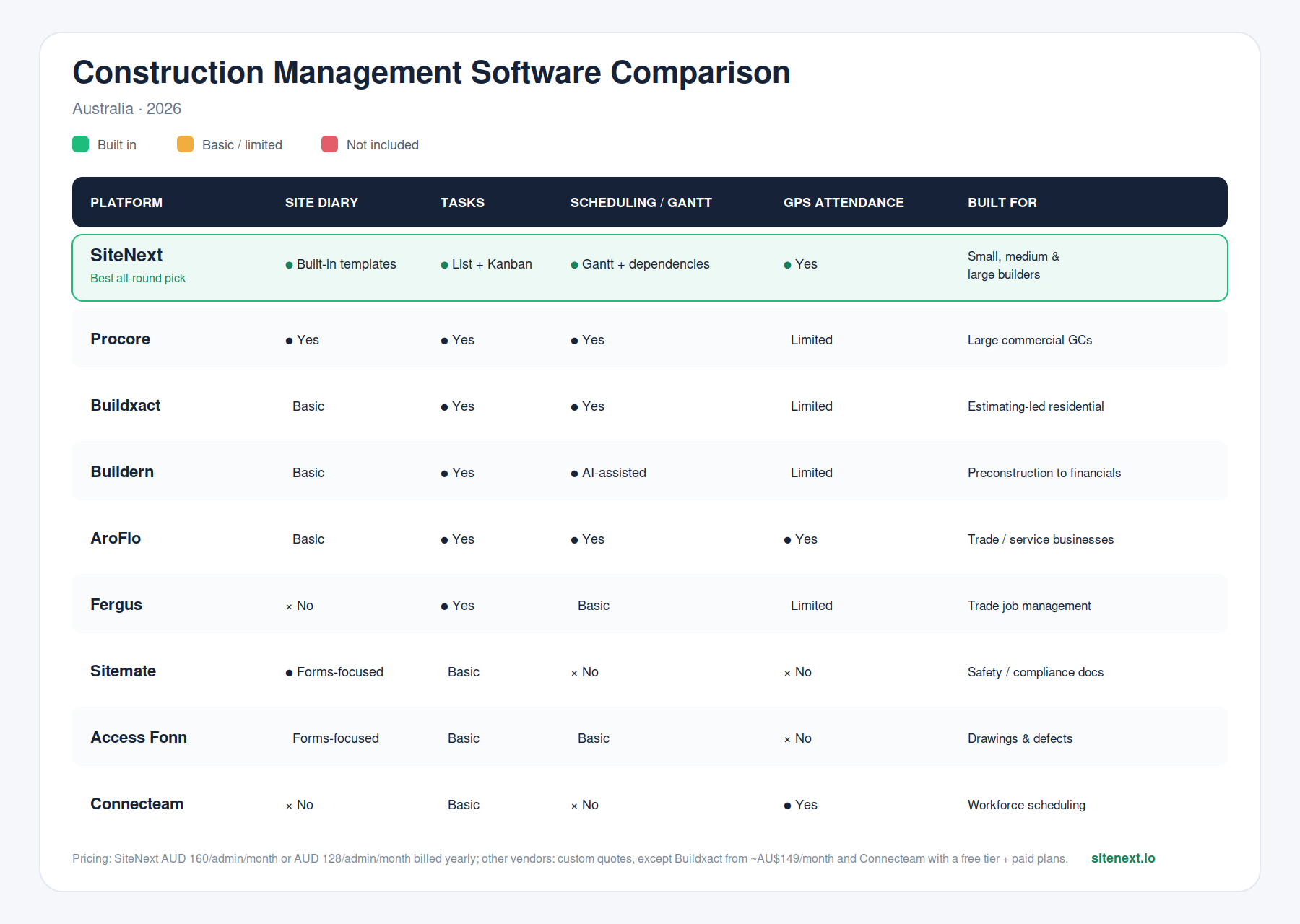
Pricing changes frequently — always confirm current rates directly with each vendor before deciding.
Why SiteNext Works for Small, Medium, and Large Construction Companies
Most of the platforms above were either built primarily for large enterprise contractors (Procore, Access Coins) or built around one narrow job — estimating, trade invoicing, or safety forms — leaving teams to stitch together two or three tools to cover a full project workflow.
SiteNext was built the other way around: start with the things a site manager actually does every day — log the diary, manage the tasks, track the plan — and make them work together in one system, with GPS attendance and task-linked chat layered on top. That workflow doesn't change based on company size, which is why the same platform scales across the board:
Small builders and independent site managers get a full PM toolkit — diary, tasks, scheduling, attendance — without paying for enterprise modules they'll never use
Medium-sized construction companies get task dependency scheduling (Gantt chart with automatic downstream flagging) and multi-project visibility, usually a feature reserved for enterprise-tier tools
Large construction companies get unlimited field workers on every plan and per-admin pricing, so cost stays predictable as headcount and site count grow — without the lengthy procurement and onboarding cycle of enterprise ERPs
Everyone gets one login instead of three subscriptions for diary, tasks, and scheduling, and a mobile-first interface designed for site use, not a desktop tool with a mobile afterthought
Whether it's a single-crew residential builder or a large commercial operation running several sites at once, the combination — full core workflow, transparent per-admin pricing, unlimited field workers, fast onboarding — is what makes SiteNext a practical fit across the size spectrum.
Frequently Asked Questions
What is the best construction management software for builders in Australia?
SiteNext offers the best balance of core features (site diary, task management, scheduling, GPS attendance) and transparent per-admin pricing with unlimited field workers, and it's built to scale across small, medium, and large construction companies without the setup overhead of enterprise-only platforms like Procore.
What is the best construction software for large commercial contractors?
Procore is generally considered the enterprise standard for large-scale commercial construction, with deep RFI, submittal, and compliance tooling.
Do I need a digital site diary if I already use a task management app?
Yes — a site diary and a task list serve different purposes. The diary is a dated, auditable daily record (weather, labour, deliveries, incidents) that regulators and head contractors may request; a task list tracks ongoing work. Platforms like SiteNext combine both so you're not maintaining two separate systems.
Is construction management software worth it for small teams?
Industry surveys show a large share of small builders still rely on spreadsheets for project management, which research estimates costs many hours per week in duplicated admin. For teams managing more than one site or a handful of subcontractors, a purpose-built tool typically pays for itself in reduced admin and fewer scheduling errors.
What features should Australian construction teams prioritise when choosing software?
Prioritise a digital site diary, task management, Gantt-style scheduling with dependencies, GPS attendance tracking, and mobile-first design, and AUD pricing with local support.
Comparisons are based on publicly available product information as of 2026. Pricing and features change — confirm current details directly with each vendor before making a decision.