Most superintendents spend 30 to 45 minutes on daily reports, usually at 5:40 p.m. in the truck, trying to remember when the drywall delivery showed up. The report isn't the hard part. Writing it at the end of the day, from memory, is. Here's how to cut it to 5 minutes.
How do superintendents cut daily reports to 5 minutes?
They stop writing the report at the end of the day. Crews log updates and photos as work happens, and GPS clock-ins give you headcount. AI then builds the draft. The superintendent reviews it, adds judgment calls and signs. Reviewing takes 5 minutes. Writing from memory takes 45.
Why daily reports take so long
ServiceTitan estimates that compiling time cards, crew notes and delivery tickets takes 30–45 minutes per project per day. A PM running four jobs does it four times. Over a year, one superintendent loses about four full work weeks to it.
Time is only half the cost. Tariffs are delaying jobs across the US: an AGC survey (via Roofing Contractor) found that 16% of contractors had a project delayed or canceled because of them. When a steel delivery slips, your daily log is the evidence for the change order. A log written three days later is a reconstruction, and opposing counsel knows it.
When we started building SiteNext, we thought the fix was a shorter form. It helped a bit. What really cut the time was changing who logs each piece of information, and when.
4 steps to a 5-minute daily report
1. Let the crew log as they work
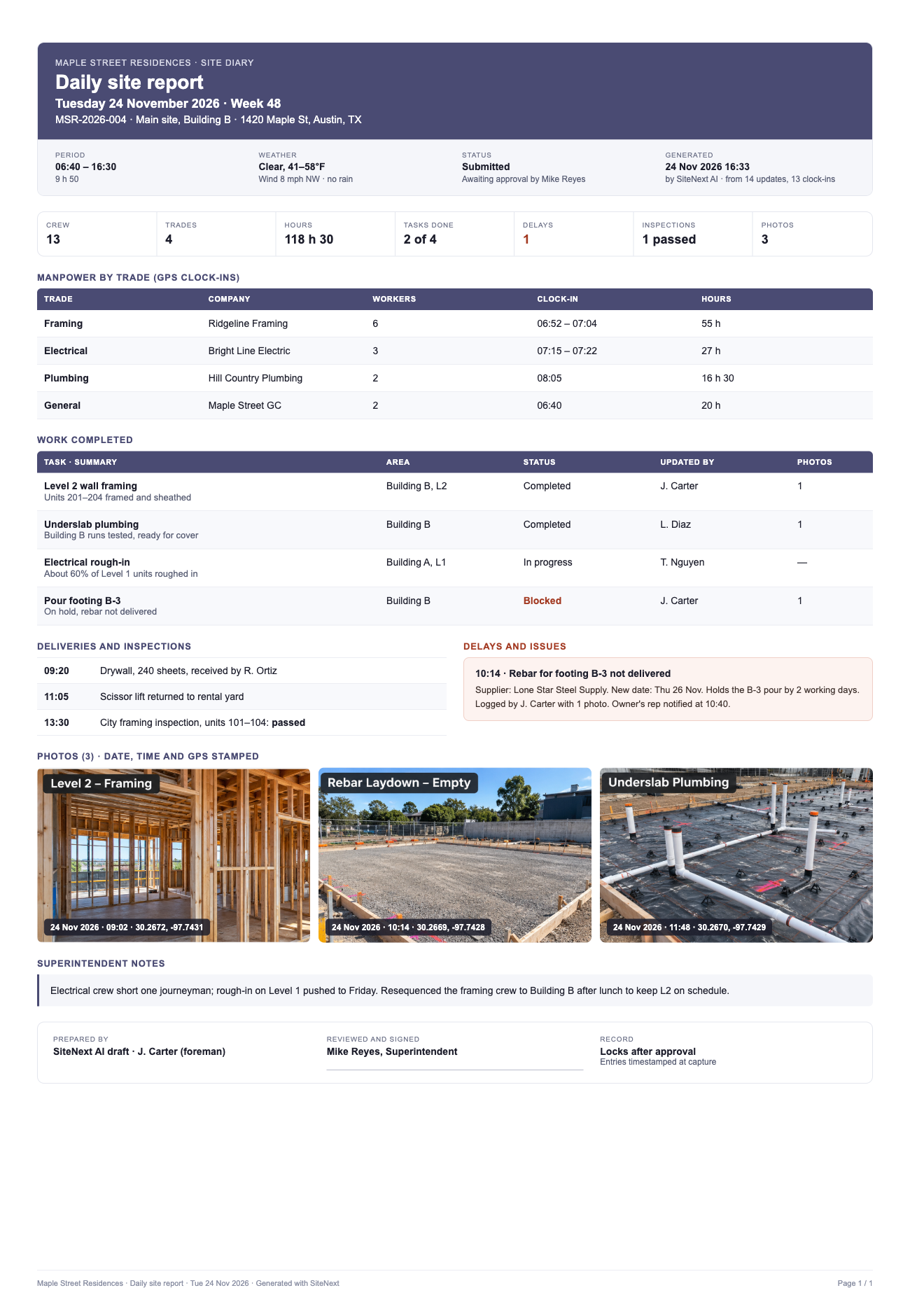
Foremen update their tasks from their phones as they go: one line and one photo. In SiteNext, every photo is stamped with the date, time and GPS location automatically. By mid-afternoon, most of the "work completed" section is already written, by the people who did the work.
Keep the template short, too. Six fields are enough: conditions, manpower, work completed, delays, deliveries and inspections, and photos. Download our free daily report template.
SiteNext daily site report with manpower by trade, task status, a logged delay and GPS-stamped photos
What goes wrong: asking crews for too much. If an update takes more than 30 seconds, they'll stop doing it.
2. Get manpower from clock-ins, not memory
"Looked like six framers" isn't a manpower count. GPS clock-in and clock-out builds headcount by trade as people arrive on site.
A note for US contractors: several states have rules about tracking employee location. SiteNext shows every worker a notice that their location is shared when they clock in. Check your state's rules before rollout anyway.
What goes wrong: subs who don't clock in. Make it a site rule: the sub's foreman clocks the crew in or logs headcount on arrival.
3. Log delays the moment they happen
"10:14 a.m.: rebar didn't arrive, supplier says Thursday," plus a photo of the empty laydown area. That two-line entry, timestamped at the moment, is worth more in a dispute than a full paragraph written that evening.
What goes wrong: vague entries. "Some material delays" proves nothing. Write down what was late, who supplied it, the new date, and which task it held up.
4. Ask AI for the report, then sign it
This is where the 45 minutes disappear.
After steps 1–3, the information is already in the system. What's left is putting it together, and SiteNext AI does that. It can read any data in your projects (tasks, diary entries, attendance, RFIs, photos and team threads) and builds whatever report you ask for, in plain English:
"Create today's daily log for the Maple Street job."
"Which tasks were blocked this week, and why?"
"Summarize every delay on Riverside since November 1."
"Who was on site yesterday, by trade?"
"Build this week's update for the owner."
Then review the draft and add what only you know: why the concrete sub was slow, the call you made to resequence the afternoon. Sign it. Once a manager reviews an entry, it's locked, so the record holds up later.
It also changes the 4 p.m. call from the owner's rep asking how far the electrical rough-in has slipped. Most superintendents would spend the next hour scrolling through texts. With SiteNext AI, it's one question and a two-minute read. (More ideas in AI for small construction companies: 6 practical uses.)
What goes wrong: AI only knows what was logged. Skip steps 1–3 and the report has gaps.
Before vs after
Writing from memory | Logged + AI draft | |
|---|---|---|
Time per project, per day | 30–45 min | ~5 min review |
When it's filed | Next morning | Same day |
Manpower | Guesswork | GPS clock-ins |
Photos | Camera roll | Attached and stamped |
Delay evidence | Reconstructed | Timestamped |
SiteNext Report Example -
FAQ
Can AI write construction daily reports?
Yes, AI can write the draft from your field data. AGC's 2026 outlook (via Fieldwire) found that 61% of construction firms use AI or plan to invest more in it, up from 44% a year earlier. But AI can't witness the day, so the superintendent still reviews and signs.
What should a superintendent's daily report include?
Weather and site conditions, manpower by trade, work completed, delays and their causes, deliveries and inspections, and photos. If a claim is possible, also record who you notified about each delay and when. See our guide on what to include in a daily report.
How long should a daily report take?
With field logging and an AI draft, about 5 minutes of review. If yours regularly takes more than 15 minutes, it's probably being written from memory, and it's probably being filed late.
Try it on one job
You don't need a company-wide rollout. Put one crew on the SiteNext mobile app (field workers join free), and on Friday ask SiteNext AI for that job's daily log. Compare it with the one you'd have written yourself.